
Geode Geometry Dash players eventually land on GitHub, either by choice or because a search result sends them there. The Geode project develops its code in public, and GitHub is where releases are published, issues are tracked and the source code lives. For someone who only wants mods, though, those pages can be confusing, and picking the wrong file is the most common install mistake we see.
This guide explains Geode on GitHub from a player's point of view: the official geode-sdk organization, which repository does what, why the source code ZIP is not an installer, how stable, alpha and nightly releases differ, how to read a changelog, what building from source involves, and how to spot fake mirrors. We are an unofficial guide, not the Geode team, so treat the official pages as the final word.
Version Note: What GitHub Shows Right Now
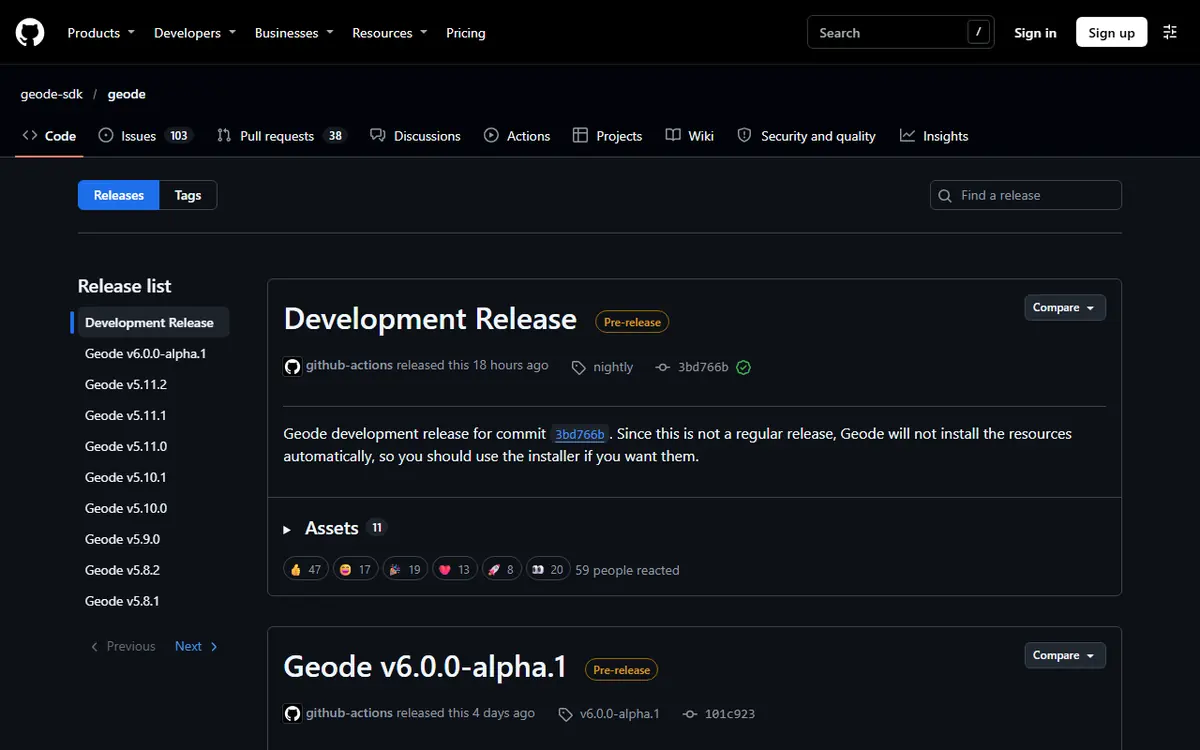
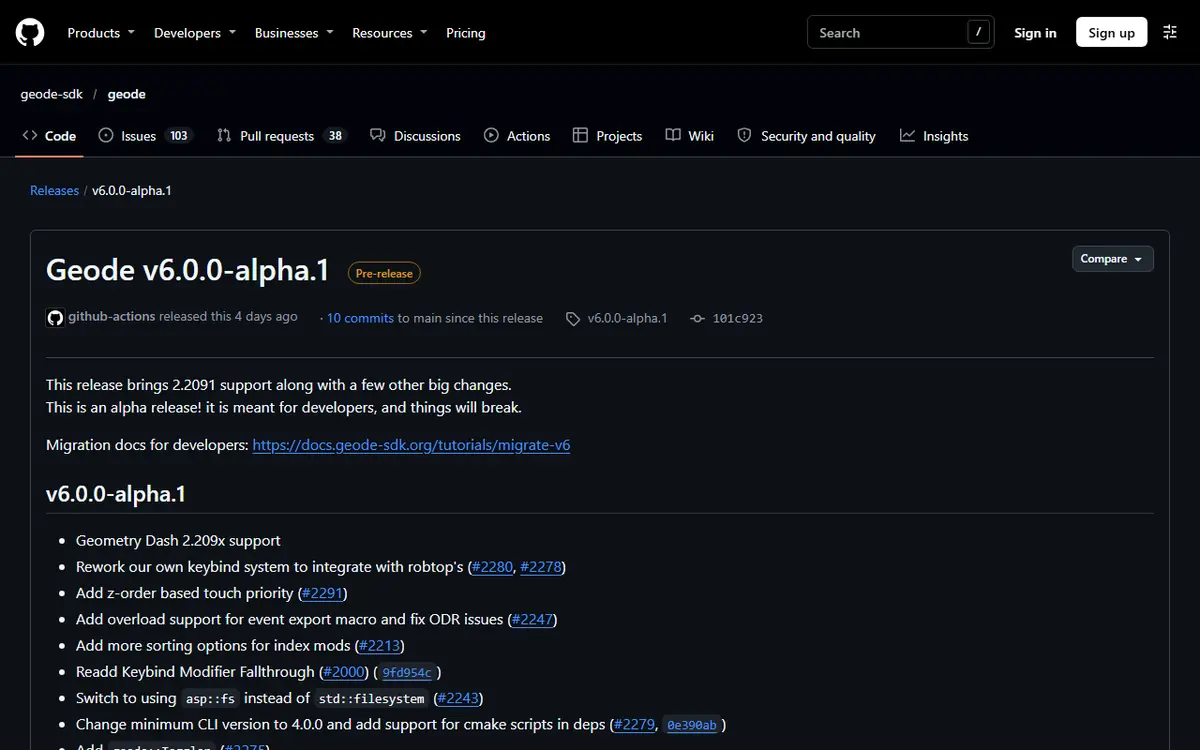
We checked the official releases list on November 5, 2026. The latest stable release is Geode v5.11.2, published October 15, 2026. Its notes say it fixes 2.209 crashes but "is still primarily for 2.2081". The newest release overall is v6.0.0-alpha.1, published November 1, 2026 and marked as a prerelease. Its notes say it "brings 2.2091 support" and that it "is meant for developers, and things will break." A separate "nightly" development release also exists for testers.
The official install page agrees: Geode is currently broken on Geometry Dash 2.2091, and v5.11.2 only works on 2.2081. If you only play, wait for a stable release with 2.2091 support. Our Geode update cycle and rollback plan explains how to ride out this kind of gap.
Why Geode Lives on GitHub
Geode is a fan-made, open-source mod loader and modding SDK for Geometry Dash, written in C++. It exists to solve mod incompatibility: instead of every mod injecting raw code and colliding with others, mods hook through one shared framework so they can work together. Publishing the code on GitHub gives the team version control, a public issue tracker, a place to attach release files and a way for contributors to propose changes.
Open source does not automatically make software safe, but it makes it transparent. Anyone can read how the loader works and report problems in the open. That is one reason the community trusts Geode, and why it is worth recognising the official organization even if you never read a line of code. Most players never need GitHub at all: the installer comes from the official Geode install page and mods come from the in-game browser.
The Official geode-sdk Organization
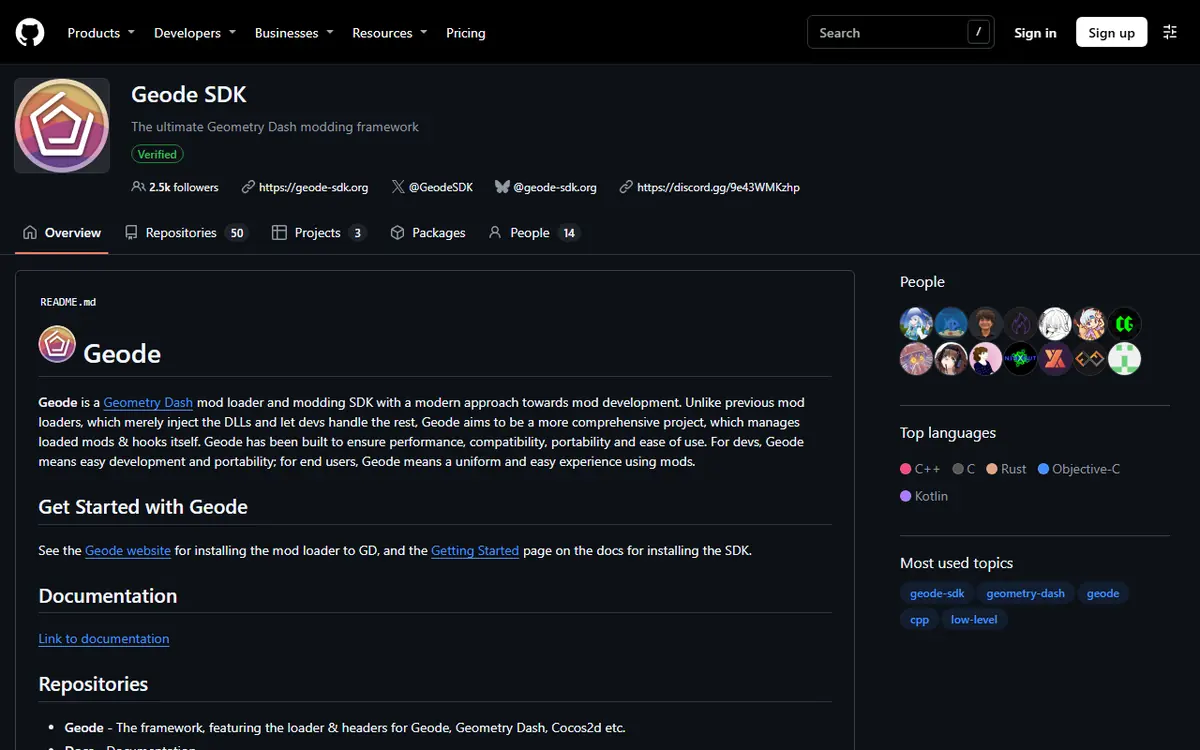
On GitHub, an organization is a shared account that owns many repositories. Geode's official organization is geode-sdk, at github.com/geode-sdk. Every official Geode repository sits under that name, so it is the first thing to check when you land on a Geode-related page.
Quick checks before you download
- The owner at the top of the page reads
geode-sdk, not a personal username or a look-alike. - The official website links to the same organization, so both sources agree.
- The repository has a long commit history, many contributors and an active issue tracker.
- Files are attached to releases in the Releases section, not hidden behind third-party download pages.
If any check fails, stop. Copying a repository is easy, so a familiar name alone proves nothing.
Main Repo, Launchers, CLI and Mods
The organization contains several repositories, each with a different job. Knowing the split helps you grab the right file for your Geode Geometry Dash setup.
| Repository | What it contains | Latest release we saw (Nov 5, 2026) | Who it is for |
|---|---|---|---|
geode-sdk/geode | The loader, the SDK and the desktop installers | v5.11.2 stable, v6.0.0-alpha.1 prerelease | All players (via installers), developers |
geode-sdk/android-launcher | The Android app that launches GD with Geode added | v1.9.0 APK (linked from the install page) | Android players |
geode-sdk/ios-launcher | The iOS launcher, shipped as .ipa and .tipa | v1.5.5 (Sep 15, 2026) | iPhone and iPad players |
geode-sdk/cli | The Geode command-line tool for building mods | v4.0.0 (Oct 30, 2026) | Mod developers |
| Official mods (e.g. NodeIDs, CustomKeybinds, textureldr, DevTools) | Source of mods maintained by the Geode team | Varies per mod | Their contributors |
| Community mod repositories | Source of mods made by individual creators | Varies per creator | That mod's developers |
The main Geode repository
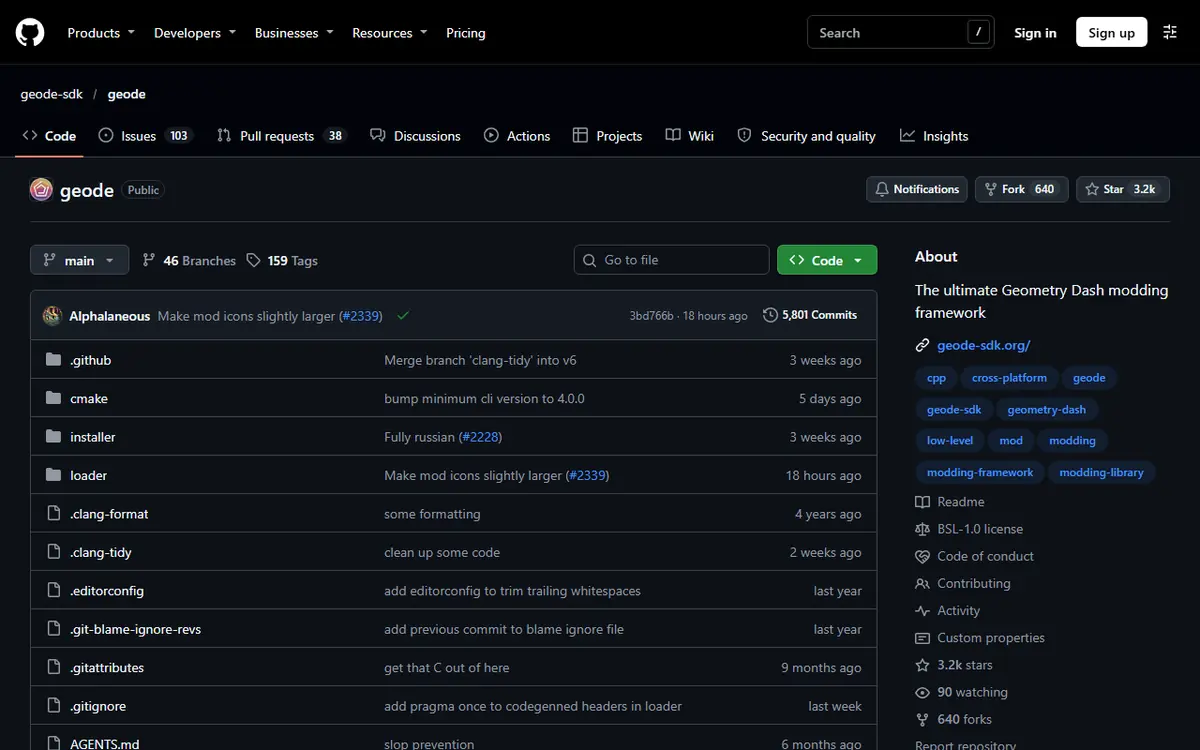
geode-sdk/geode holds the core: the loader and the SDK that mod developers build against. Loader releases, including the desktop installers, are published here. When people say "Geode on GitHub" they usually mean this repository.
Launchers and tooling
Android and iOS use launchers with their own repositories and release histories. On Android, the launcher "launches a vanilla copy of Geometry Dash with the Geode loader added", so you still need the full game from the Play Store. Our Android launcher setup guide covers that path. The CLI repository is only relevant if you plan to make mods.
Where mods fit
Most mods are made by community developers and live under their own accounts. Players should still install them through the in-game Geode menu or the official mods index, which lists mods as .geode packages.
Source Code ZIP vs. Real Installers
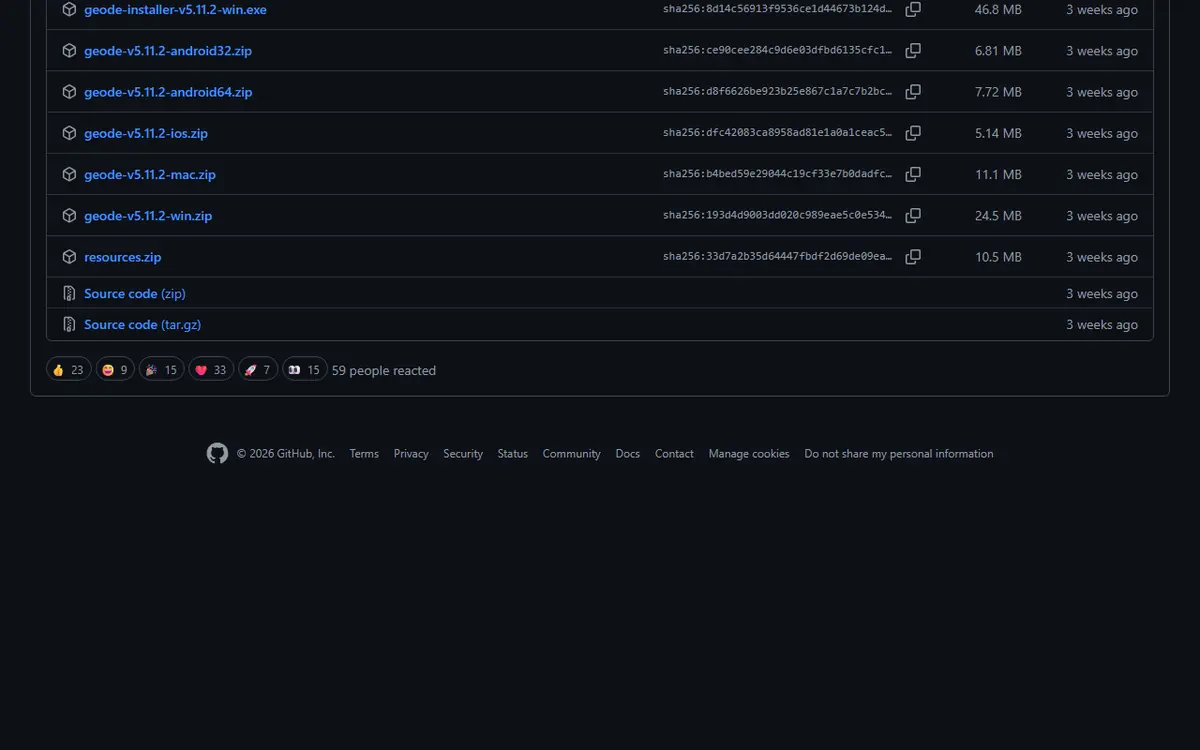
This is the single most common mistake. Every GitHub repository and every release shows automatic "Source code (zip)" and "Source code (tar.gz)" downloads. GitHub generates those for every project. They contain raw, uncompiled code, not a program you can run. Unpacking the Geode source ZIP into your game folder does nothing useful.
The files players actually want
Each Geode release has hand-attached files called release assets. For v5.11.2 and v6.0.0-alpha.1 they follow the same pattern:
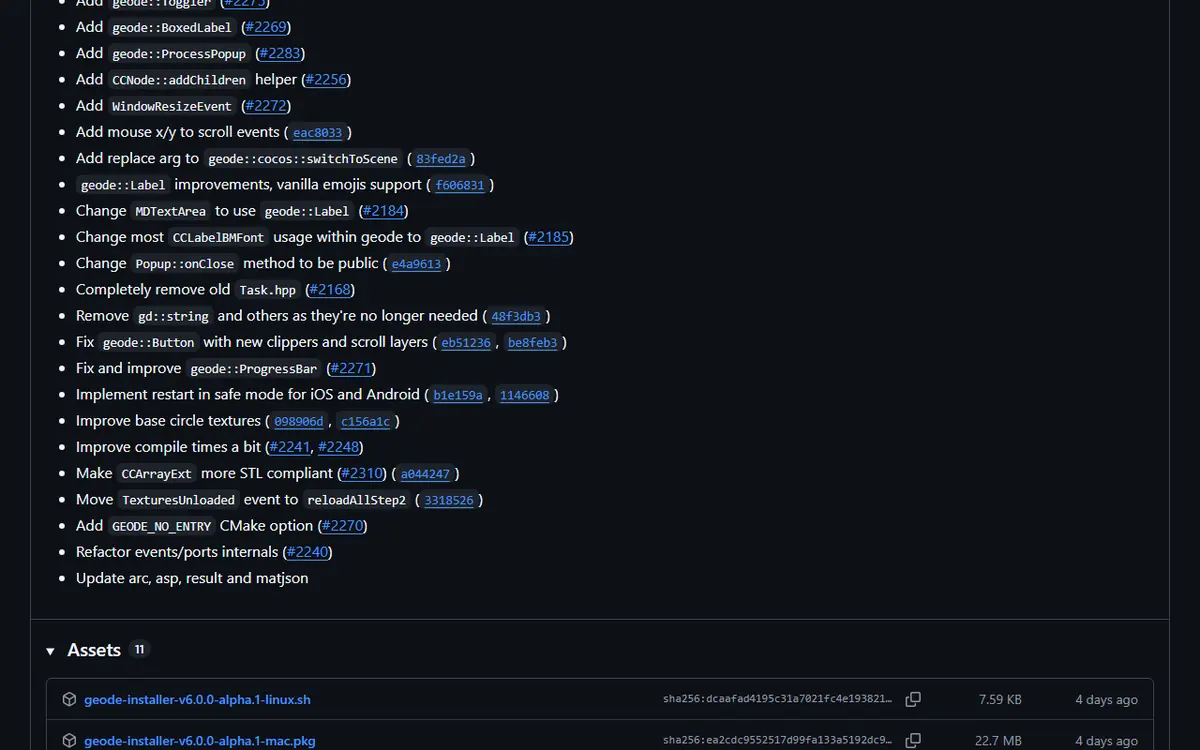
geode-installer-v…-win.exefor Windowsgeode-installer-v…-mac.pkgfor macOSgeode-installer-v…-linux.shfor Linux setupsgeode-v…-win.zip,-mac.zip,-android32.zip,-android64.zip,-ios.zipandresources.zip, which are loader packages used by installers, launchers and advanced users
For a normal setup, the easiest path is still the official install page, which links the same Windows and macOS installers plus the Android launcher. Step-by-step help is in our Geode PC install guide.
Stable, Alpha and Nightly Releases
GitHub's Releases section is a list of tagged versions with notes and attached files. Knowing which label you are looking at saves you from needless crashes.
- Stable releases are meant for everyday use. First-time players should always start here.
- Prereleases and alphas, like v6.0.0-alpha.1, are early builds so developers can start updating their mods. Many mods will not work yet.
- Nightly builds are automatic development snapshots for testers. Expect bugs.
Why game updates restart the cycle
Each Geometry Dash update changes the game code Geode hooks into, so Geode breaks until a compatible version ships. This happened after 2.206, 2.207, 2.2081 and now 2.2091. Since 2.206, the PC game is 64-bit, so older mods had to be rebuilt. Alphas are the first step back to compatibility; stable follows once the team and mod authors catch up.
How to Read a Geode Changelog
Release notes can look dense, but a few habits make them quick to scan:
- Find the supported GD version first. If your game is newer than the target, Geode may run in forward compatibility mode with some features disabled, and crashes usually come from outdated mods.
- Look for breaking changes. The v6 alpha, for example, requires Geode CLI 4.0.0 and links migration docs for developers. Expect some mods to be missing until their authors update.
- Check the prerelease label. "alpha", "beta" or "nightly" means testing build.
- Match fixes to your problem. Compare the notes with the newest file in your
geode/crashlogsfolder to see whether an update will help.
Building Geode From Source
Building from source means compiling the code yourself. Contributors and testers do this; players never need to. Even mod authors usually do not compile the loader: they install the Geode CLI and SDK and build their own mod into a .geode file. At a high level, a build needs a C++ toolchain, CMake and Git as described in the official getting started docs, a clone of the official repository, and a supported copy of the full game for testing. If you want to make a mod, start with our first Geode mod tutorial instead.
Platform Notes
- Windows and macOS: use the installer asset (.exe or .pkg). The installer finds your Steam game folder or lets you pick it.
- Android: use the launcher APK from geode-sdk/android-launcher, not the android32/android64 ZIPs.
- iOS: follow the launcher's INSTALL.md, which compares TrollStore, SideStore, LiveContainer and certificate methods.
- Linux: the official FAQ says to run the Windows installer through Wine and set a DLL override.
Troubleshooting GitHub Downloads
- The installer does nothing after extracting a ZIP: you probably downloaded the source code. Get the installer asset instead.
- Mods vanished after installing an alpha: they do not support the alpha yet. Go back to the stable release or wait.
- Windows warns about the file: confirm it came from geode-sdk or geode-sdk.org before allowing it. The official FAQ notes antivirus false positives can quarantine Geode files.
- Release page shows 404: check the owner and tag; old tags can be removed or renamed.
Safety: Spotting Fake Mirror Repositories
Popular projects attract copycats. Some are harmless forks; others push malware or shady download pages. Warning signs include:
- The owner is not geode-sdk, even though the repository name looks official.
- The README points to an external download site instead of releases or geode-sdk.org.
- Password-protected archives or executables with odd names.
- A tiny or single-commit history.
- Promises the real project does not make, such as Geometry Dash Lite support or a cracked full game.
- Instructions to disable antivirus or enter your Geometry Dash password. Geode never needs it.
If you already ran something suspicious, delete it, scan your device, change your password if you typed it anywhere, and reinstall from the official source. Steam users can also use "Verify integrity of game files" to restore a clean game. Our Geode safety guide goes deeper on fake APKs and account protection.
Frequently Asked Questions
What is the official Geode GitHub organization called?
It is called geode-sdk. The loader, the Android and iOS launchers and the Geode CLI all live under github.com/geode-sdk, so check that owner name before you trust any repository or release file.
Can I install Geode by downloading the source code ZIP?
No. The source code ZIP is raw, uncompiled code and not an installer. Use the installer on Windows or macOS, or the launcher on Android and iOS, from geode-sdk.org/install or from the release assets on GitHub.
Should I install Geode v6.0.0-alpha.1?
Only if you are a mod developer. The release notes say it brings GD 2.2091 support but is an alpha meant for developers and that things will break. The latest stable, v5.11.2, targets GD 2.2081.
Which file do I need from a Geode GitHub release?
Pick the asset for your platform: geode-installer-…-win.exe for Windows, geode-installer-…-mac.pkg for macOS, or the Linux .sh installer. Android players should use the separate Android launcher APK instead of the android ZIP files.
Are mods hosted in the geode-sdk organization?
A few official mods are, such as Node IDs, Custom Keybinds, Texture Loader and DevTools. Most mods belong to community creators and their own repositories. Players should install mods from the in-game browser or the official mods index.
How can I tell if a Geode repository is fake?
Check that the owner is geode-sdk, that files are attached to real releases with a normal history, and that the README does not push external download sites, Lite support or password requests. When in doubt, use geode-sdk.org/install.
