Geode Geometry Dash setup on a Windows computer is easier than most players expect, but a few small details decide whether your first launch is smooth or frustrating. This guide walks through the full process for the Steam version of the game, from locating the right folder to installing your first mods and fixing the problems that tend to appear on day one.
Geode is a fan-made, open-source mod loader and modding SDK for Geometry Dash. It gives every mod a shared framework to hook into the game, which is why mods built for it can run side by side instead of fighting over the same code. This site is an unofficial guide and is not affiliated with the Geode team or RobTop Games, so the official Geode install page is always the final word on downloads.
Version Note: What Works on PC Today
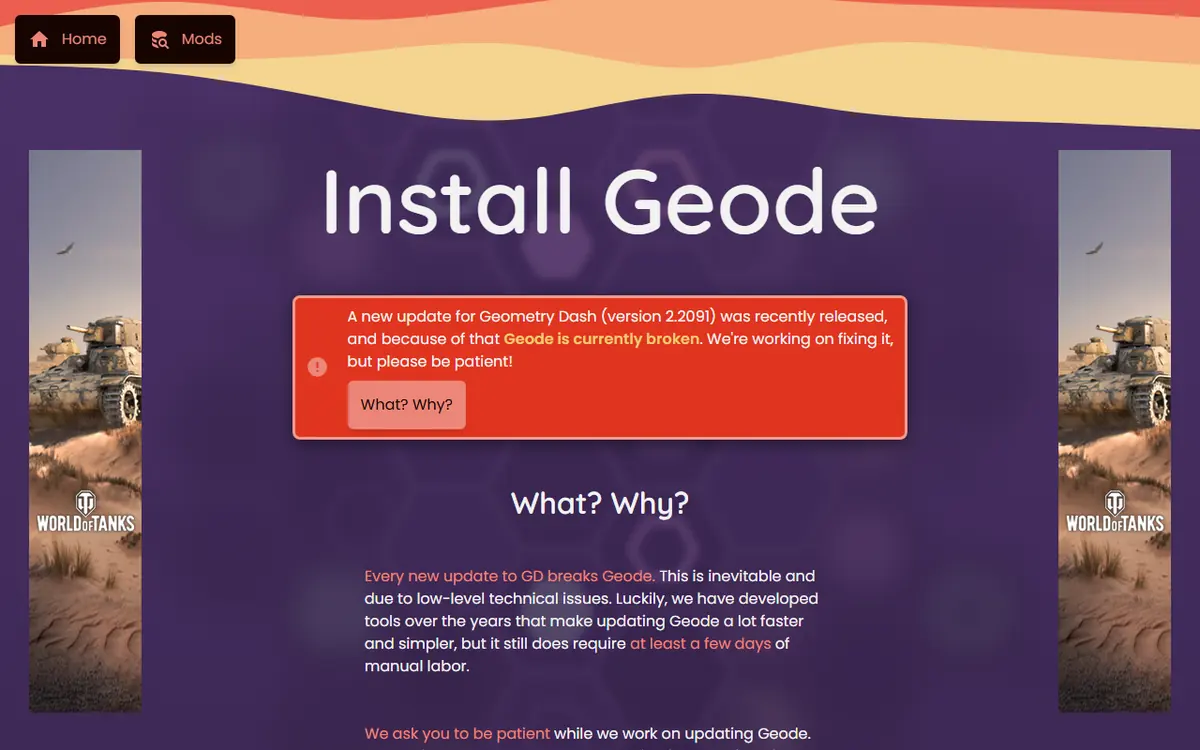
Before you download anything, check which game version you have. On November 5, 2026, we checked the official sources and found this status:
- Geode v5.11.2 (released October 15, 2026) is the latest stable release. The official install page says it only works on GD 2.2081.
- Geode v6.0.0-alpha.1 (November 1, 2026) adds GD 2.2091 support, but its release notes call it an alpha that is "meant for developers, and things will break."
- The install page currently states that Geode is broken on GD 2.2091 and that the team is working on a fix.
If your Steam copy has already updated to 2.2091, most players should wait for a stable Geode release rather than run the alpha. You can follow progress on the official Geode releases page.
Before You Start: What You Need
Most failed installs trace back to one of these items, so spend two minutes on this checklist first.
- The full version of Geometry Dash. Geode targets the paid game. Geometry Dash Lite is not supported.
- A legitimate Steam copy. Cracked or repackaged copies are a common source of crashes and malware, and nobody can reliably support them.
- A compatible game version. See the version note above.
- A backup of your save. Save data is stored separately from the mods folder, but syncing your progress to your Geometry Dash account first is a sensible habit.
- Administrator access, if needed. The default Steam library sits inside Program Files, and some systems ask for permission before an installer can write there.
Platform Notes for Windows Players
This guide covers the Steam release on Windows, which is what the official Windows installer expects. If you play on a Mac or on Linux, the steps differ: macOS has its own installer, and Linux runs the Windows build through Wine or Proton. Those paths are covered in our Mac and Linux setup guide. Players with several Steam library folders on different drives should pay extra attention to the folder step below, because installing into the wrong copy is the single most common reason the Geode button never shows up.
Since GD 2.206, the PC version of the game is 64-bit. Mods built for older 32-bit releases had to be rebuilt, so old mod files lying around from years ago will not carry over. Start fresh with the in-game mod browser instead.

Finding Your Geometry Dash Game Folder
The installer tries to detect the folder automatically, and on a standard Steam setup it usually succeeds. Knowing the location yourself still helps with manual selection and with checking crash logs later. On most machines with a single Steam library, the game lives here:
C:\Program Files (x86)\Steam\steamapps\common\Geometry Dash
If you moved your Steam library to another drive, the path will differ. The most reliable way to find it is through Steam itself:
- Open Steam and go to your Library.
- Right-click Geometry Dash.
- Choose Manage, then Browse local files.
- A File Explorer window opens inside the game folder. Copy the path from the address bar if the installer needs it.
Running the Geode Installer Step by Step
With the folder confirmed, the Geode Geometry Dash PC installation itself takes only a minute or two.
- Close Geometry Dash completely. If the game is running in the background, the installer may fail to write its files.
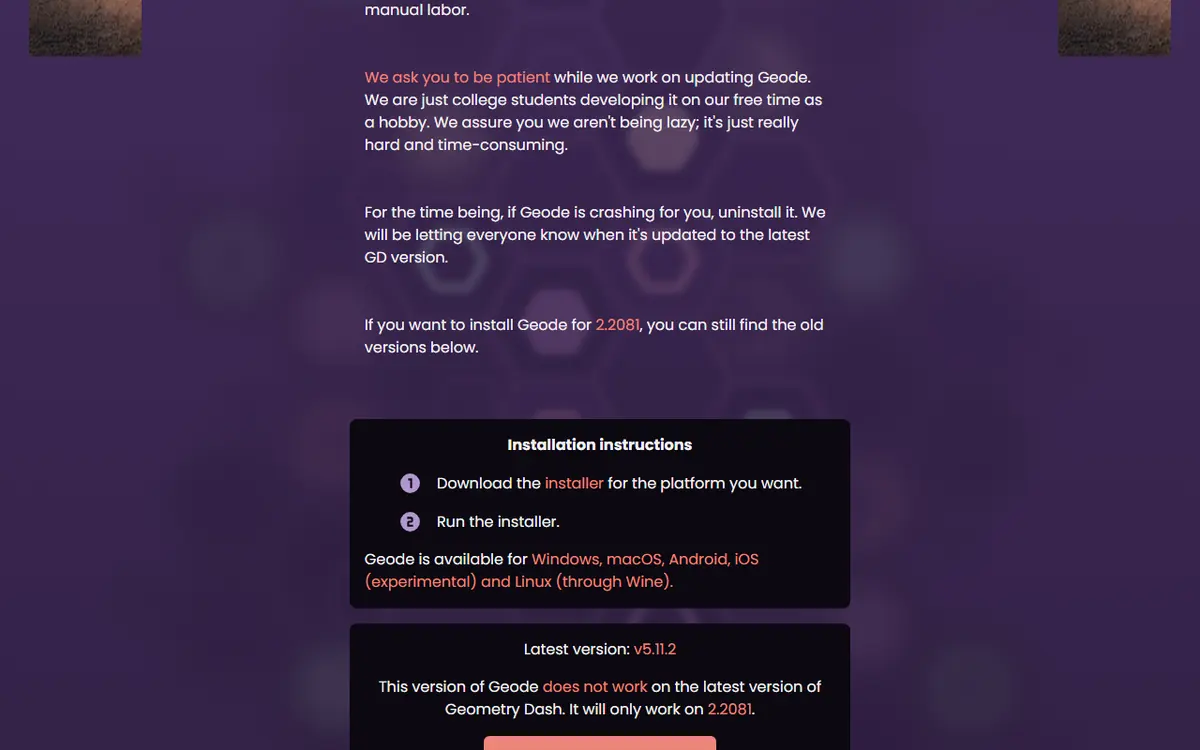
- Download the official installer. On geode-sdk.org/install, the Windows button gives you the installer
.exe(v5.11.2 at the time of writing). Do not use mirrors, file-hosting pages or video descriptions. - Run the installer. If Windows SmartScreen warns that the file is not commonly downloaded, continue only if it came from the official install page.
- Confirm or select the game folder. Let the installer find Geometry Dash, or browse to the folder you opened through Steam.
- Finish and launch. Start the game through Steam as usual and look for the new Geode button.
Do Not Use the Source-Code Zip
The main Geode repository on GitHub offers a source-code zip, like every code repository. That archive is not an installer, and extracting it into your game folder installs nothing useful. Players should use the platform installer; the source code is for developers who want to read or build the project. Our Geode GitHub and source code guide explains the difference in detail.
What Changes After Installation
Once the install completes, a new folder named geode appears inside your Geometry Dash directory. Knowing its layout saves a lot of guesswork.
| Location | What It Holds | When You Need It |
|---|---|---|
geode | Geode's core files and folders | Confirming the install worked |
geode\mods | Installed mod packages (.geode files) | Removing a broken mod by hand |
geode\crashlogs | Crash reports written when the game fails | Diagnosing crashes or asking for help |
| Geode button (main menu) | The in-game mod browser and settings | Installing, enabling and configuring mods |
None of these folders contain your save data. That separation lets you clear out mods without touching your levels, stars or icons.
Your First Launch With Geode
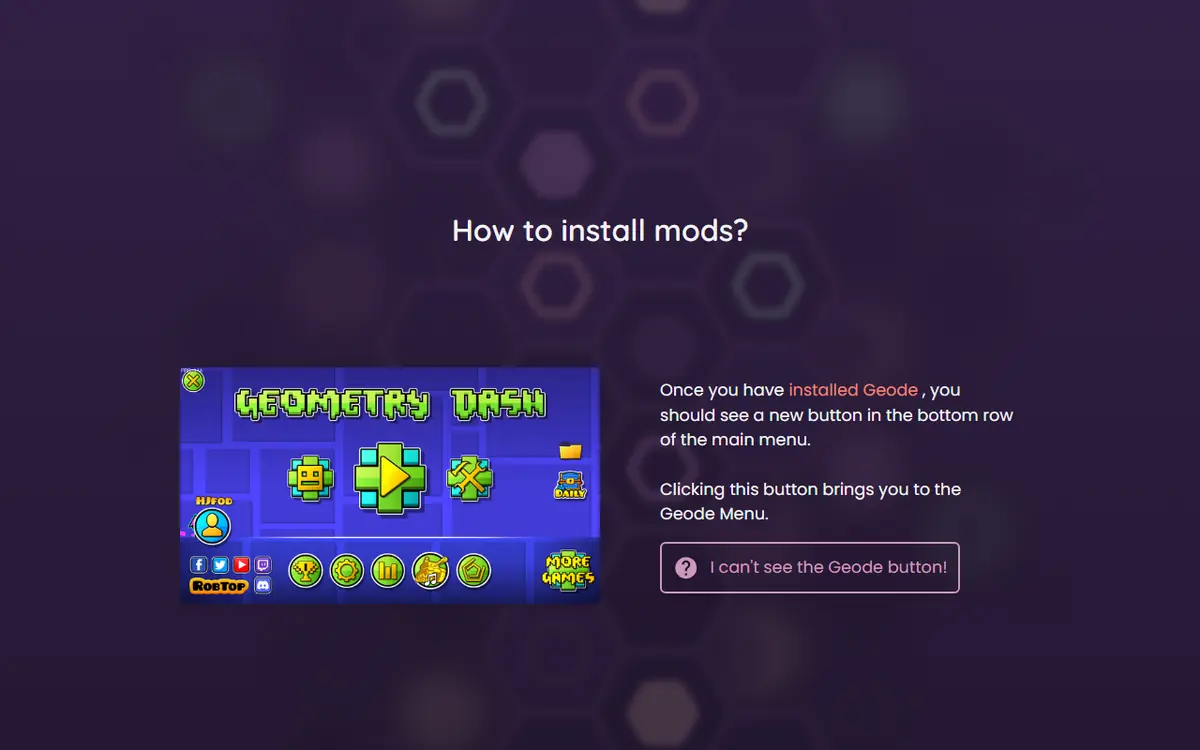
Launch Geometry Dash through Steam. The first start may take slightly longer while Geode prepares itself. According to the official install page, the Geode button appears in the bottom row of the main menu. It opens the Geode menu, where you can enable, disable, view or uninstall mods and browse tabs such as Recommended, Download and Trending.
Understanding Forward Compatibility Mode
When Geometry Dash updates before Geode does, Geode may run in forward compatibility mode. It logs a warning and keeps going with some features disabled. If the game crashes in this state, the cause is usually an outdated mod rather than Geode itself.
Installing Your First Mods
The in-game browser is the heart of the Geode Geometry Dash experience. You do not need files from random websites or drag anything into folders.
- Open the Geode menu from the main menu button.
- Switch to the Download tab to see the online mod index.
- Search for a mod by name or scroll the featured and trending lists.
- Open a mod's page, read its description, then install it.
- Restart the game when Geode asks, so the new mod can load.
New users often install too many mods at once, which makes problems hard to trace. Start with two or three well-known ones, such as BetterInfo, Custom Keybinds or Startpos Switcher, and add more gradually. Our best Geode mods guide lists the most downloaded options by category.
Some mods rely on others. Node IDs, for example, is a dependency that many mods need. Geode installs and loads dependencies automatically, so if you see a mod you did not choose, something else probably needs it. Every mod can also be switched off individually, which is a better first test than uninstalling.
Common First-Run Problems and Fixes
The Geode Button Does Not Appear
Check that a geode folder exists in the directory you opened through Steam. If it is missing, the installer likely wrote to a different folder, often because you have more than one Steam library. Run the installer again and select the path manually. The official FAQ also notes that antivirus software can quarantine a Geode file as a false positive; if that happens, restore it and add an exception.

The Game Crashes on Startup
A crash right after installing a mod usually points to that mod. Use Safe Mode: the official FAQ says to hold Shift before launching Geometry Dash and keep holding it until loading finishes. Safe Mode loads no mods, so you can open the Geode menu and disable the suspect. The newest file in geode\crashlogs often names the mod involved.
Everything Broke After a Game Update
This is the most common situation of all. Updates such as 2.206, 2.207, 2.2081 and 2.2091 have each broken Geode for a while. Wait for a stable Geode release, disable mods that have not been updated, and do not reinstall over and over, because that does not change compatibility. The Geode not working fixes guide covers more cases.
Staying Safe and Playing Fair
Geode is open source, but that transparency only protects you if you use the real thing. Download only from geode-sdk.org or the official Geode GitHub organization, and avoid mirror repositories, cracked game bundles or pages promising a special version. Geode never needs your Geometry Dash password; any tool asking for it is a scam.
Some mod menus, such as Mega Hack (a paid mod) and Eclipse, include cheat-style tools like noclip and speedhack. They are useful for practice, but using them on leaderboard runs or rated completions can get a player leaderboard-banned.
How to Uninstall Cleanly
To return to an unmodded game, use the uninstall option in the official installer. Steam users can then run Verify integrity of game files from the game's properties to restore original files. Saves are stored separately, but sync to your account first. The update, manage and uninstall guide walks through every platform.
Frequently Asked Questions
Does Geode Geometry Dash support the free Lite version?
No. Geode targets the full version of Geometry Dash. Geometry Dash Lite is not supported, so you need the paid Steam game to use mods through Geode on Windows.
Which Geode version should I install on PC right now?
As of November 5, 2026, the latest stable release is Geode v5.11.2, which works with GD 2.2081. GD 2.2091 support exists only in v6.0.0-alpha.1, an alpha the Geode team says is meant for developers.
Where does the Geode installer put its files on PC?
It creates a folder named geode inside your Geometry Dash game directory. Mods go into geode\mods and crash reports into geode\crashlogs. On a default Steam setup, the game directory sits inside steamapps\common.
Will installing Geode delete my save data?
Installing Geode should not touch your save data, which is stored separately from the mods folder. Even so, save your progress to your Geometry Dash account before any big change.
How do I start Geometry Dash without mods if it keeps crashing?
Use Safe Mode. According to the official Geode FAQ, you hold Shift before launching Geometry Dash and keep holding it until loading finishes. Safe Mode loads no mods, so you can disable the one causing the crash.
Is it safe to download Geode from video descriptions or mirror sites?
It is not recommended. Download only from geode-sdk.org/install or the official Geode GitHub organization. Mirror pages and repackaged bundles can contain modified files and offer nothing the official installer does not.
